Multi View#
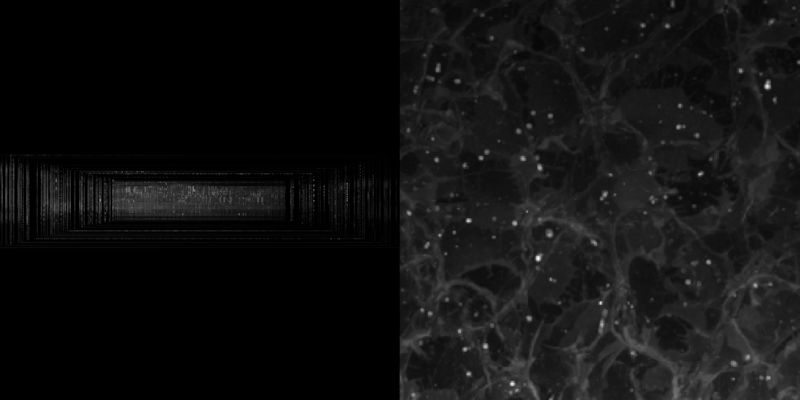
Demonstrates multiple views of volumetric data with interactive slicing.
Shows two channels of volumetric data: the left view displays the full volume with a perspective camera where mousing over the volume extracts and displays a 2D slice from the other channel in pink at the intersection point. The right view shows an orthographic top-down perspective with no interaction.
import cmap
import numpy as np

import scenex as snx
from scenex.app.events import Event, MouseMoveEvent
from scenex.model import BlendMode
from scenex.model._transform import Transform
from scenex.utils import projections

# Load in some example data
try:
    from imageio.v2 import volread

    url = "https://gitlab.com/scikit-image/data/-/raw/2cdc5ce89b334d28f06a58c9f0ca21aa6992a5ba/cells3d.tif"
    data = np.asarray(volread(url)).astype(np.uint16)[:, :, :, :]
except ImportError:
    data = np.random.randint(0, 2, (60, 2, 128, 128)).astype(np.uint16)

imgs: list[snx.Image] = []
img_data = data[:, 1, :, :]

vols: list[snx.Volume] = []
vol_data = data[:, 0, :, :]


# FIXME: VisPy can't currently use two Cameras in the same Scene.
# Until we enable multiple adaptors tied to the same model, we need multiple scenes
# here. This is an internal limitation of VisPy's ViewBox, see:
# https://github.com/vispy/vispy/blob/7b6b11c9d050bf2cc6f77844252e737d2b060579/vispy/scene/widgets/viewbox.py#L71
def _make_scene() -> snx.Scene:
    # The volume will show the first channel
    vol = snx.Volume(
        blending=BlendMode.ADDITIVE,
        data=vol_data,
        clims=(vol_data.min(), vol_data.max()),
    )
    vols.append(vol)

    # The image will show the second channel
    img = snx.Image(
        data=img_data[0],
        blending=BlendMode.ADDITIVE,
        cmap=cmap.Colormap("magenta"),
        clims=(img_data.min(), img_data.max()),
        opacity=0,
    )
    imgs.append(img)

    # The scene contains both the volume and the image
    return snx.Scene(children=[vol, img])


# We'll make two views on the same scene
view1 = snx.View(
    scene=_make_scene(),
    camera=snx.Camera(interactive=True),
)
view2 = snx.View(
    scene=_make_scene(),
    camera=snx.Camera(interactive=True),
)

# Partition the canvas into two halves for the first two views
view1.layout.x_end = view2.layout.x_start = "50%"

# And put them on the same canvas
view_size = 400
canvas = snx.Canvas(width=2 * view_size, height=view_size, views=[view1, view2])


# Interaction: The left view shows the full gray volume with a perspective camera.
# When mousing over it, we find where the ray intersects the volume, extract the
# 2D slice from the other channel at that z-position, and display it in pink at
# the intersection. The right view uses an orthographic camera looking down the
# -z axis and has no mouse interaction.
def _view1_event_filter(event: Event) -> bool:
    if isinstance(event, MouseMoveEvent):
        if not (ray := view1.to_ray(event.pos)):
            return False
        for node, distance in ray.intersections(view1.scene):
            if node in vols:
                intersection = ray.point_at_distance(distance)
                idx = max(0, min(59, round(intersection[2])))
                for img in imgs:
                    img.data = img_data[idx]
                    img.transform = Transform().translated((0, 0, idx))
                    img.opacity = 1
                return False
    for img in imgs:
        img.opacity = 0
    return False


view1.set_event_filter(_view1_event_filter)

snx.show(canvas)

# Orbit around the center of the volume
orbit_center = np.mean(np.asarray(view2.scene.bounding_box), axis=0)

# The first camera can orbit around the center of the volume
view1.camera.transform = Transform().translated(orbit_center).translated((300, 0, 0))
view1.camera.look_at(orbit_center, up=(0, 0, 1))
# Perspective projection for 3D
view1.camera.projection = projections.perspective(
    fov=70,
    near=1,
    far=1_000_000,  # Just need something big
)
view1.camera.controller = snx.Orbit(center=orbit_center)

# The second camera can just look down (-z) at the center of the volume
view2.camera.transform = Transform().translated(orbit_center).translated((0, 0, 300))
view2.camera.projection = projections.orthographic(
    img_data.shape[1], img_data.shape[2], depth=1000
)

snx.run()