Basic Points#
Interactive points example demonstrating ColorModel subclasses and scaling modes.
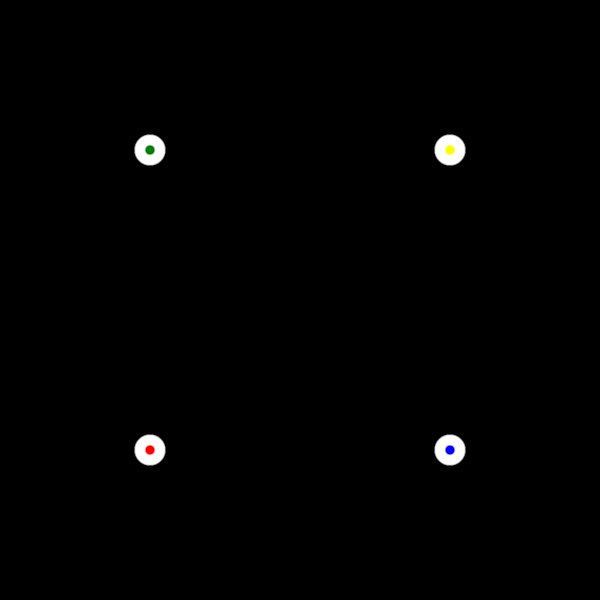
This example shows: - Per-vertex coloring with VertexColors (each point gets a different color) - Uniform coloring with UniformColor (all points same color) - Fixed vs. scene-based point scaling modes - Interactive color swapping on mouse hover (face and edge colors swap)
The points start with per-vertex face colors (red, green, blue, yellow) and a white uniform edge. When the mouse hovers over any point, the colors invert: faces become white (uniform) and edges become colored (per-vertex).
Scaling modes: - "fixed": Point size in pixels, stays constant when zooming - "scene": Point size in world-space units, scales when zooming
import cmap
import numpy as np

import scenex as snx
from scenex.app.events import Event, MouseMoveEvent
from scenex.utils import projections

# Here is our points data
vertices = np.array(
    [
        [0, 0, 0],
        [0, 1, 0],
        [1, 0, 0],
        [1, 1, 0],
    ]
)
colors = [
    cmap.Color("red"),
    cmap.Color("green"),
    cmap.Color("blue"),
    cmap.Color("yellow"),
]
# Scenex provides a few different modes for point sizing.
# "fixed" scaling means the point size is defined in screen space (pixels),
# so it remains constant (fixed) as you zoom in and out.
points = snx.Points(
    name="point",
    vertices=vertices,
    size=20,  # Pixel diameter
    edge_width=10,
    scaling="fixed",
    face_color=snx.VertexColors(color=colors),
    edge_color=snx.UniformColor(color=cmap.Color("white")),
)
# "scene" scaling means the point size is defined in world space,
# so it varies as you zoom in and out.
# You can uncomment the following lines to try it out.
# points = snx.Points(
#     name="point",
#     vertices=vertices,
#     size=1,  # World-space diameter
#     edge_width=0,
#     scaling="scene",
#     face_color=snx.VertexColors(color=colors),
#     edge_color=snx.UniformColor(color=cmap.Color("white")),
# )


# Since ray-point intersections are computed in canvas space, we need view+canvas
view = snx.View(
    scene=snx.Scene(children=[points]), camera=snx.Camera(controller=snx.PanZoom())
)


def _on_view_event(event: Event) -> bool:
    if isinstance(event, MouseMoveEvent):
        if (ray := view.to_ray(event.pos)) is None:
            return False
        if ray.intersections(points):
            points.face_color = snx.UniformColor(color=cmap.Color("white"))
            points.edge_color = snx.VertexColors(color=colors)
        else:
            # Restore vertex colors
            points.face_color = snx.VertexColors(color=colors)
            points.edge_color = snx.UniformColor(color=cmap.Color("white"))
    return False


view.set_event_filter(_on_view_event)

# Show and position camera
snx.show(view)
view.camera.projection = projections.orthographic(2, 2, 1e5)
view.camera.transform = snx.Transform().translated((0.5, 0.5))
snx.run()