Draggable Rect#
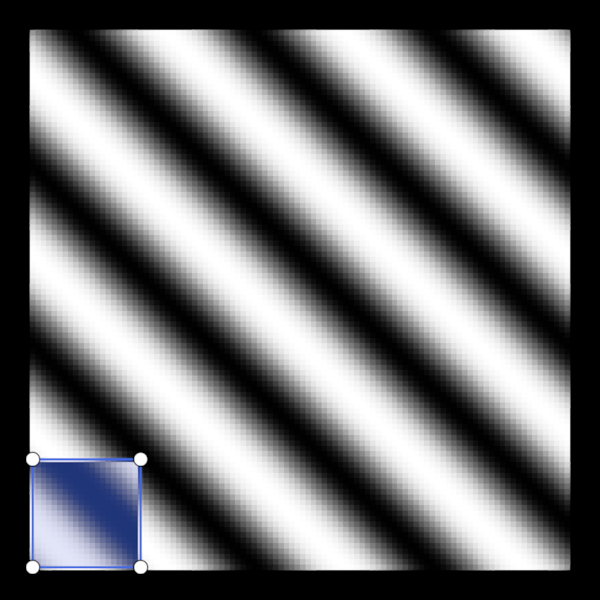
Draggable rectangle with corner handles overlaid on a grayscale image.
Pixels contained within the rectangle are inverted in the background image. Note that, for a pixel to be considered "contained" its center must be contained.
This example demonstrates: - Composing a rectangle from three nodes: a semi-transparent mesh (fill), a solid line (outline), and disc point markers (handles). - Using an event filter to implement click-and-drag interactions. - Changing cursor shapes to signal behaviors.
import cmap
import numpy as np

import scenex as snx
from scenex.app import CursorType
from scenex.app.events import (
    Event,
    MouseButton,
    MouseLeaveEvent,
    MouseMoveEvent,
    MousePressEvent,
    MouseReleaseEvent,
)

# -- Background image -- #
IMG_W, IMG_H = 100, 100

xx, yy = np.meshgrid(np.linspace(0, 6 * np.pi, IMG_W), np.linspace(0, 6 * np.pi, IMG_H))
img_data = ((np.sin(xx + yy) * 0.5 + 0.5) * 255).astype(np.uint8)

bg = snx.Image(
    data=img_data,
    cmap=cmap.Colormap("grays"),
    clims=(0, 255),
    order=0,
)

# -- Rectangle nodes -- #
RECT_VERTICES = np.array([[0, 0, 0], [20, 0, 0], [20, 20, 0], [0, 20, 0]], dtype=float)

rect_mesh = snx.Mesh(
    vertices=RECT_VERTICES,
    faces=np.array([[0, 1, 2], [0, 2, 3]]),
    color=snx.UniformColor(color=cmap.Color("royalblue")),
    opacity=0.25,
    order=1,
)

rect_line = snx.Line(
    parent=rect_mesh,
    vertices=RECT_VERTICES[[0, 1, 2, 3, 0]],
    color=snx.UniformColor(color=cmap.Color("royalblue")),
    width=2.0,
    order=2,
)

handles = snx.Points(
    parent=rect_mesh,
    vertices=RECT_VERTICES,
    size=14,
    face_color=snx.UniformColor(color=cmap.Color("white")),
    symbol="disc",
    scaling="fixed",
    order=3,
)

# ── Scene / View ──────────────────────────────────────────────────────────────
scene = snx.Scene(children=[bg, rect_mesh])
view = snx.View(
    scene=scene,
    camera=snx.Camera(controller=snx.PanZoom(), interactive=True),
)
canvas = snx.show(view)

# ── Drag state ────────────────────────────────────────────────────────────────
_anchor: tuple[float, float] | None = None  # resize: fixed opposite corner
_drag_start: np.ndarray | None = None  # translate: cursor pos last frame


def _cursor_for_pos(wx: float, wy: float) -> CursorType:
    # Even corners (BL=0, TR=2) are on the main diagonal
    # Odd corners (BR=1, TL=3) on the anti-diagonal.
    return (
        CursorType.BDIAG_ARROW
        if _nearest_corner(wx, wy) % 2 == 0
        else CursorType.FDIAG_ARROW
    )


# ── Helpers ───────────────────────────────────────────────────────────────────


def _vertices_from_corners(x0: float, y0: float, x1: float, y1: float) -> np.ndarray:
    """Takes any two opposite corners of a rectangle and returns all four vertices.

    These vertices are returned in counter-clockwise order as
    bottom-left, bottom-right, top-right, top-left.
    """
    mi = (min(x0, x1), min(y0, y1))
    ma = (max(x0, x1), max(y0, y1))
    return np.asarray(
        [
            (mi[0], mi[1], 0),
            (ma[0], mi[1], 0),
            (ma[0], ma[1], 0),
            (mi[0], ma[1], 0),
        ]
    )


def _nearest_corner(wx: float, wy: float) -> int:
    """Index of the corner handle nearest to world position (wx, wy)."""
    world = rect_mesh.transform.map(rect_mesh.vertices)[:, :2]
    return int(np.argmin(np.linalg.norm(world - [wx, wy], axis=1)))


# ── Event filter ──────────────────────────────────────────────────────────────


def _event_filter(event: Event) -> bool:
    global _anchor, _drag_start

    if isinstance(event, MouseMoveEvent):
        if not (ray := view.to_ray(event.pos)):
            return False
        pos = np.array(ray.origin[:2])

        # -- Dragging a handle -- #
        if _anchor is not None:
            # Determine the new rectangle bounding box from the anchor point and the
            # mouse position
            new_vertices = _vertices_from_corners(pos[0], pos[1], *_anchor)
            # Update the nodes
            rect_mesh.vertices = new_vertices
            rect_line.vertices = new_vertices[[0, 1, 2, 3, 0]]
            handles.vertices = new_vertices
            # Reset the cursor in case we are "flipping" the rectangle
            # by dragging a corner past an edge it is not connected to.
            snx.set_cursor(canvas, _cursor_for_pos(*pos))
            return True

        # -- Dragging the whole rectangle -- #
        if _drag_start is not None:
            # Determine the offset since the last mouse event
            delta = pos - _drag_start
            # Offset two vertices to get the new rectangle bounding box
            # NOTE we just need two opposite corners, doesn't matter which two.
            v0 = rect_mesh.vertices[0, :2] + delta
            v2 = rect_mesh.vertices[2, :2] + delta
            new_vertices = _vertices_from_corners(*v0, *v2)
            # Update the nodes
            rect_mesh.vertices = new_vertices
            rect_line.vertices = new_vertices[[0, 1, 2, 3, 0]]
            handles.vertices = new_vertices
            # Record the new position for a future drag
            _drag_start = pos
            return True

        # -- Hover -- #
        if ray.intersections(handles):
            snx.set_cursor(canvas, _cursor_for_pos(*pos))
        elif ray.intersections(rect_mesh):
            snx.set_cursor(canvas, CursorType.ALL_ARROW)
        else:
            snx.set_cursor(canvas, CursorType.DEFAULT)

    elif isinstance(event, MousePressEvent):
        if event.buttons & MouseButton.LEFT:
            if not (ray := view.to_ray(event.pos)):
                return False
            pos = np.array(ray.origin[:2])
            # -- Start a handle drag -- #
            if ray.intersections(handles):
                # Find the clicked point
                clicked = _nearest_corner(*pos)
                # And record the other point
                opp = (clicked + 2) % 4
                _anchor = rect_mesh.vertices[opp, :2]
                return True
            # -- Start a rectangle drag -- #
            if ray.intersections(rect_mesh):
                _drag_start = pos
                return True

    elif isinstance(event, MouseReleaseEvent):
        # -- End a drag -- #
        _anchor = None
        _drag_start = None
        return True

    elif isinstance(event, MouseLeaveEvent):
        # -- End a drag -- #
        _anchor = None
        _drag_start = None
        snx.set_cursor(canvas, CursorType.DEFAULT)

    return False


def _on_vertices_changed(vertices: np.ndarray) -> None:
    # Offset by 0.5 because pixels are at integers, not half-integers.
    xs = vertices[:, 0]
    ys = vertices[:, 1]
    x0 = int(np.clip(np.ceil(xs.min()), 0, IMG_W))
    x1 = int(np.clip(np.ceil(xs.max()), 0, IMG_W))
    y0 = int(np.clip(np.ceil(ys.min()), 0, IMG_H))
    y1 = int(np.clip(np.ceil(ys.max()), 0, IMG_H))

    display = img_data.copy()
    display[y0:y1, x0:x1] = 255 - img_data[y0:y1, x0:x1]
    bg.data = display


# Connect the event filter to listen for user events
view.set_event_filter(_event_filter)

# Connect the vertex change callback
_on_vertices_changed(rect_mesh.vertices)  # initialize display
rect_mesh.events.vertices.connect(_on_vertices_changed)

# Run!
snx.run()