Antialiasing#
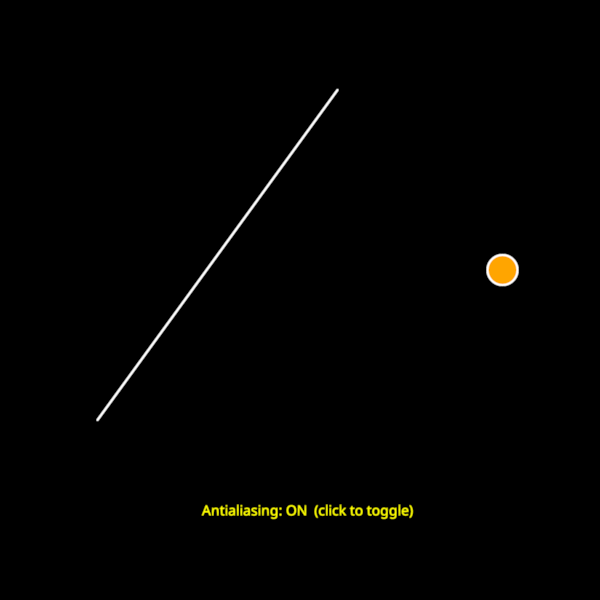
Demonstrates antialiasing for Lines, Points, and Text.
Three nodes are shown — a diagonal line, a disc point, and a text label —
each supporting the antialias property.
Interaction - Left-click anywhere in the view to toggle antialiasing on all nodes. The status text updates to reflect the current state.
Antialiasing is most noticeable on the diagonal line (jagged stairstepping appears on its edges without AA) and on the curved edge of the disc.
import cmap
import numpy as np

import scenex as snx
from scenex.app.events import Event, MousePressEvent
from scenex.utils import projections

# --- Diagonal line on the left side ---
# A steep diagonal makes aliasing (stairstepping) clearly visible.
line = snx.Line(
    vertices=np.array([[-0.7, -0.5, 0], [0.1, 0.6, 0]], dtype=np.float32),
    color=snx.UniformColor(color=cmap.Color("white")),
    width=2.0,
    antialias=True,
)

# --- Single disc point on the right side ---
point = snx.Points(
    vertices=np.array([[0.65, 0.0, 0]], dtype=np.float32),
    size=30,
    scaling="fixed",
    face_color=snx.UniformColor(color=cmap.Color("orange")),
    edge_color=snx.UniformColor(color=cmap.Color("white")),
    edge_width=2.0,
    antialias=True,
)

# --- Status label at the bottom ---
status_text = snx.Text(
    text="Antialiasing: ON  (click to toggle)",
    color=cmap.Color("yellow"),
    size=14,
    antialias=True,
    transform=snx.Transform().translated((0, -0.8, 0)),
)

view = snx.View(
    scene=snx.Scene(children=[line, point, status_text]),
    camera=snx.Camera(),
)


def _toggle_antialias(event: Event) -> bool:
    if isinstance(event, MousePressEvent):
        # Toggle the antialiasing state for all nodes and update the status text.
        new_aa = not line.antialias
        line.antialias = new_aa
        point.antialias = new_aa
        status_text.antialias = new_aa
        state = "ON" if new_aa else "OFF"
        status_text.text = f"Antialiasing: {state}  (click to toggle)"
        return True
    return False


view.set_event_filter(_toggle_antialias)

snx.show(view)
view.camera.projection = projections.orthographic(2, 2, 1e5)
snx.run()