Getting Started#
Creating an Application#
Typical usage will begin by creating a Application
object.
from app_model import Application

my_app = Application("my-app")
Registering Actions#
Most applications will have some number of actions that can be invoked by the user. Actions are typically callable objects that perform some operation, such as "open a file", "save a file", "copy", "paste", etc. These actions will usually be exposed in the application's menus and toolbars, and will usually have associated keybindings. Sometimes actions hold state, such as "toggle word wrap" or "toggle line numbers".
app-model provides a high level Action object that
comprises a pointer to a callable object, along with placement in menus, keybindings,
and additional metadata like title, icons, tooltips, etc...
from app_model.types import Action, KeyBindingRule, KeyCode, KeyMod, MenuRule


def open_file():
    print("open file!")


def close_window():
    print("close window!")


ACTIONS: list[Action] = [
    Action(
        id="open",
        title="Open",
        icon="fa6-solid:folder-open",
        callback=open_file,
        menus=["File"],
        keybindings=[KeyBindingRule(primary=KeyMod.CtrlCmd | KeyCode.KeyO)],
    ),
    Action(
        id="close",
        title="Close",
        icon="fa-solid:window-close",
        callback=close_window,
        menus=["File"],
        keybindings=[KeyBindingRule(primary=KeyMod.CtrlCmd | KeyCode.KeyW)],
    ),
    # ...
]
Actions are registered with the application using the
Application.register_action() method.
for action in ACTIONS:
    my_app.register_action(action)
Registries#
The application maintains three internal registries.
Application.commandsis an instance ofCommandsRegistry. It maintains all of the commands (the actual callable object) that have been registered with the application.Application.menusis an instance ofMenusRegistry. It maintains all of the menus and submenu items that have been registered with the application.Application.keybindingsis an instance ofKeyBindingsRegistry. It maintains an association between a KeyBinding and a command id in theCommandsRegistry.
Note
Calling Application.register_action with a single
Action object is just a convenience around independently registering
objects with each of the registries using:
Registry events#
Each of these registries has a signal that is emitted when a new item is added.
CommandsRegistry.registeredis emitted with the new command id (str) wheneverCommandsRegistry.register_commandis calledMenusRegistry.menus_changedis emitted with the new menu ids (set[str]) wheneverMenusRegistry.append_menu_itemsor if the menu items have been disposed.KeyBindingsRegistry.registeredis emitted (no arguments) wheneverKeyBindingsRegistry.register_keybinding_ruleis called.
You can connect callbacks to these events to handle them as needed.
@my_app.commands.registered.connect
def on_command_registered(command_id: str):
    print(f"Command {command_id!r} registered!")


my_app.commands.register_command("new-id", lambda: None, title="No-op")
# Command 'new-id' registered!
Executing Commands#
Registered commands may be executed on-demand using execute_command method on the command registry:
my_app.commands.execute_command("open")
# prints "open file!" from the `open_file` function registered above.
Command Arguments and Dependency Injection#
The execute_command function does accept *args and **kwargs that will
be passed to the command. However, very often in a GUI application
you may wish to infer some of the arguments from the current state of the
application. For example, if you have menu item linked to a "close window",
you likely want to close the current window. For this, app-model uses
a dependency injection pattern, provided by the
in-n-out library.
The application has a injection_store
attribute that is an instance of an in_n_out.Store. A Store is a collection
of:
- providers: Functions that can be called to return an instance of a given type. These may be used to provide arguments to commands, based on the type annotations in the command function definition.
- processors: Functions that accept an instance of a given type and do something with it. These are used to process the return value of the command function at execution time, based on command definition return type annotations.
See in-n-out getting started
for more details on the use of providers/processors in the Store.
Here's a simple example. Let's say an application has a User object with a name()
method:
class User:
    def name(self):
        return "John Doe"
Assume the application has some way of retrieving the current user:
def get_current_user() -> User:
    # ... get the current user from somewhere
    return User()
We register this provider function with the application's injection store:
my_app.injection_store.register_provider(get_current_user)
Now commands may be defined that accept a User argument, and used
for callbacks in actions registered with the application.
def print_user_name(user: User) -> None:
    print(f"Hi {user.name()}!")


action = Action(
    id="greet",
    title="Greet Current User",
    callback=print_user_name,
)

my_app.register_action(action)
my_app.commands.execute_command("greet")
# prints "Hi John Doe!"
Connecting a GUI framework#
Of course, most of this is useless without some way to connect the application
to a GUI framework. The app_model.backends module
provides functions that map the app-model model onto various GUI framework models.
erm... someday 😂
Well, really it's just Qt for now, but the abstraction is valuable for the ability to swap backends. And we hope to add more backends if the demand is there.
Qt#
Currently, we don't have a generic abstraction for the application window, so
users are encouraged to directly use the classes in the app_model.backends.qt
module. One of the main classes is the QModelMainWindow object: a subclass of QMainWindow that knows how to map
an Application object onto the Qt model.
from app_model.backends.qt import QModelMainWindow
from qtpy.QtWidgets import QApplication

app = QApplication([])

# create the main window with our app_model.Application
main = QModelMainWindow(my_app)

# pick menus for main menu bar,
# using menu ids from the application's MenusRegistry
main.setModelMenuBar(["File"])

# add toolbars using menu ids from the application's MenusRegistry
# here we re-use the File menu ... but you can have menus
# dedicated for toolbars, or just exclude items from the menu
main.addModelToolBar("File")
main.show()

app.exec()
You should now have a QMainWindow with a menu bar and toolbar populated with the actions you registered with the application with icons, keybindings, and callbacks all connected.
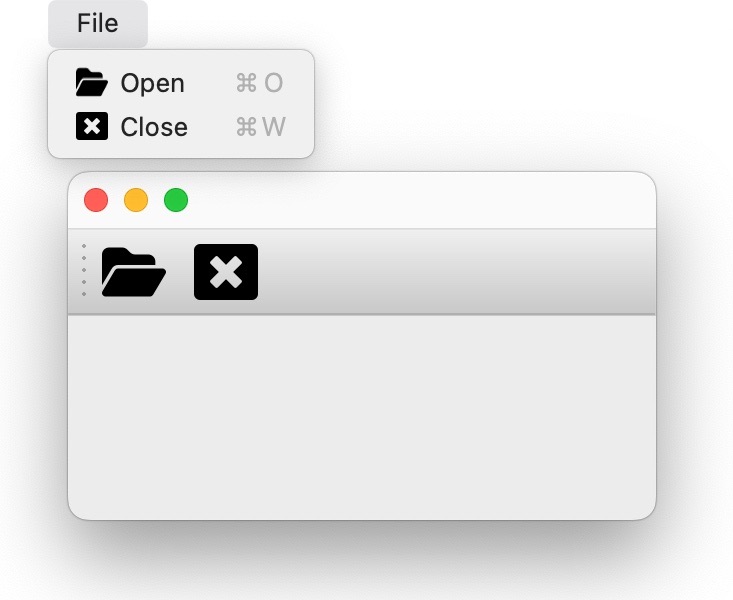
Once objects have been registered with the application, it becomes very easy to
create Qt objects (such as
QMainWindow,
QMenu,
QMenuBar,
QAction,
QToolBar, etc...) with very minimal
boilerplate and repetitive procedural code.
See all objects in the Qt backend API docs.
Tip
Application registries are backed by
psygnal, and emit events when modified.
These events are connected to the Qt objects, so QModel... objects such as
QModelMenu and QCommandAction will be updated when the application's
registry is updated.